
RSpace continues rapid development of new RSpace Inventory Management module
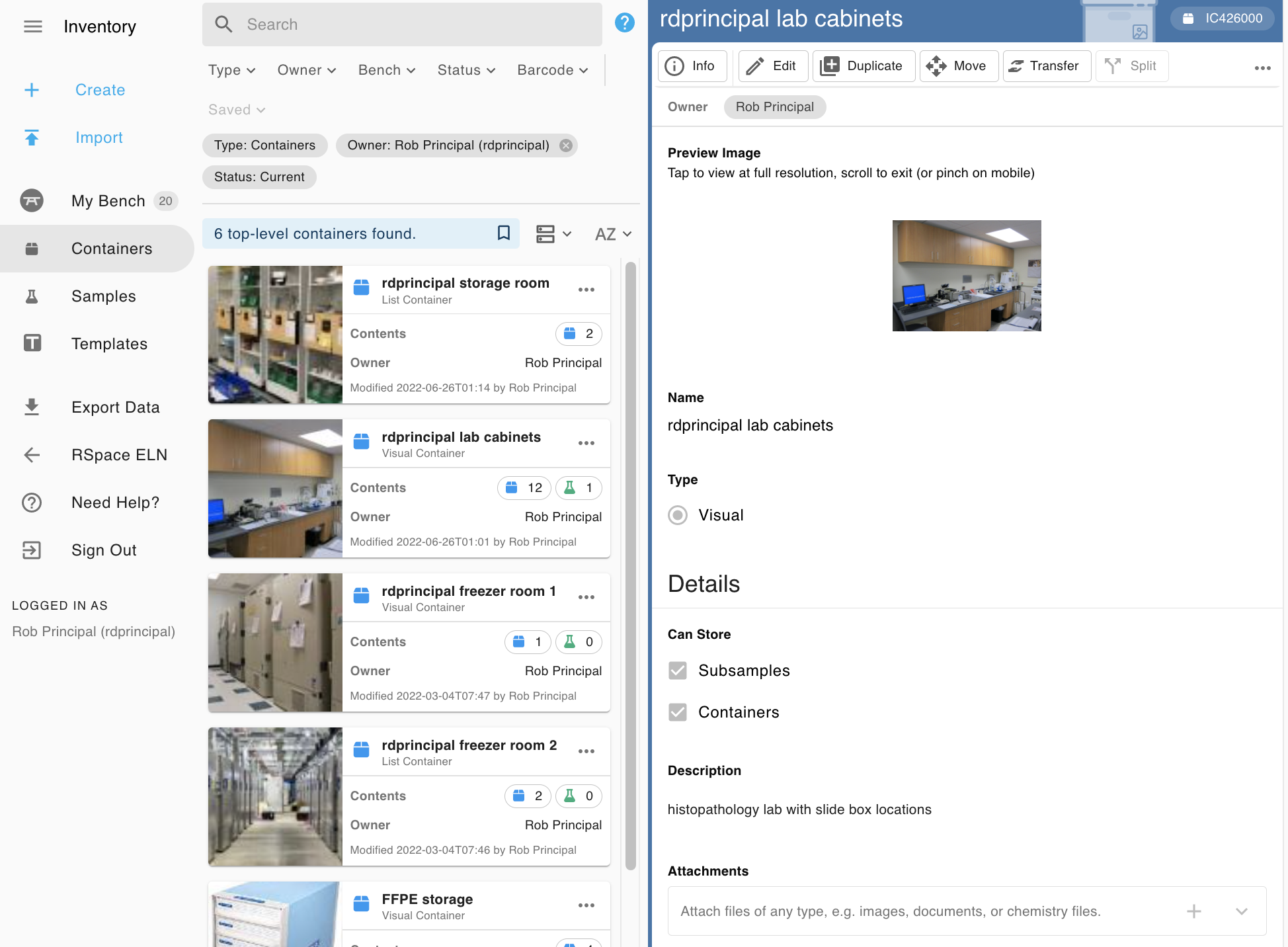
The RSpace Inventory Management system (RSINV) builds on the innovative feature set of its predecessor eCAT and is distinguished from other similar systems by its flexibility, emphasis on use with modern mobile devices, support for features like phone-based reading of QR codes and a intuitive navigational system that emphasizes the way most users search for items now; using visual clues and hierarchic organization to allow rapid location of what you need from among thousands of items in your lab. Learn more here.
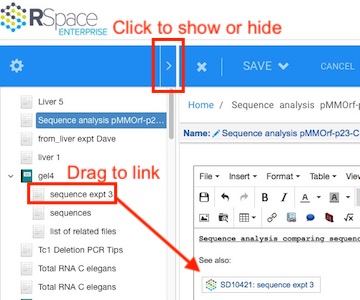
RSpace 1.50, May 2018 – Easy Document Tree Navigation
New Document Tree for easy navigation
Contact us. We’ll be happy to set up a webcast demo of this or any other features of RSpace ELN.
Communicate better, slacker…
Users who use Slack are already making good use of our built-in support for this communication app. We have extended this functionality by creating some simple “slash apps“. Learn more about these here. We would love to hear about other slash apps made or suggested by our “slackiest” power users!
For additional details about other new features and improvements, consult the changelog. Don’t forget to visit our website, blog, and YouTube channel for more insights on upcoming features, usage tips and events.
RSpace 1.49, March 2018 – Shareable Calendar and Event Creation, plus Easy Document Previews
In the last few months we have added lots of new features and refinements to RSpace Version 1.49, from expanded calendar functions to a “quick peek” glance into your document files:
Keepin’ it simple…
We streamlined the main edit toolbar and tucked away icons for some of the features you don’t use every day. You can still find those features in the dropdown menus. We also added new “Science Tools” and “Online Tools” dropdowns to make it easier for scientists to conveniently perform simple calculations and lookups many scientists use in their research.
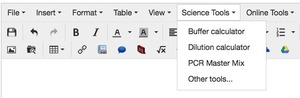
Let us know what sorts of other tools you would like to see in those dropdowns.
Let me add that to my calendar….
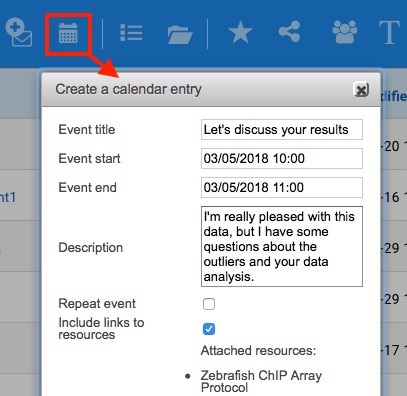
RSpace has included integration with your main system calendar for quite some time, but we have now made it easier to access that feature from the workspace with the new “Create Calendar Entry” icon, which creates downloadable .ics files linked to selected RSpace resources.
What’s in that doc… ?
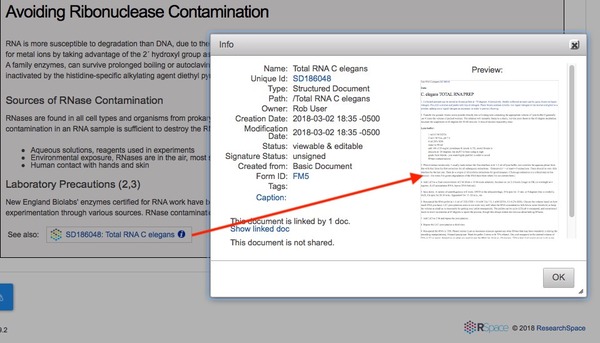
As RSpace offers more and more ways to link things together, and as the amount of data in your system grows, it can be hard to remember which links point at which documents. To help jog your memory, we have added visual previews in the “info” windows for embedded links, so that you can see what the linked document looks like without leaving your current location.
For additional details about other new features and improvements, consult the changelog. Don’t forget to visit our website, blog, and YouTube channel for more insights on upcoming features, usage tips and events.
RSpace 1.47, Nov 2017 – Calculation Tables and Enhanced Traceability
Version 1.47 is now available to all users. Here’s a look at just two of the new features:
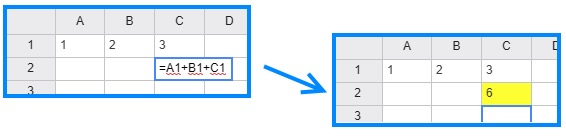
New advanced calculation table based on “handsontable” javascript tool.
- math functions:
+-*/^ - logical functions:
=><>=<=<>NOT - trigonometric functions: SIN, ASIN, etc.
- other formulas like: SUM, SQRT, LOG, ROUND, IF, AND, OR
… and many other operations
To create a new calculation table, click the  icon in the RSpace editor tool bar. If you need help getting started, check out the documentation here.
Enhanced lab data traceability features: See how and where data has been used throughout the history of your lab’s research program.
Making your lab’s data traceable across different projects and between users is a key goal of our solution. You can already enter RSpace IDs in the Workspace search tool to instantly locate specific resources, and you can use IDs as persistent links inside or outside RSpace to show the source of your data and conclusions, making RSpace the virtual hub of everything you do. In version 1.47 we have improved lab data traceability further by making it easy to see where specific data files have been used, and how notebook pages or resources have been cited by other pages or documents. This will help users follow paths that define research stories and better understand the sources and future uses of underlying data related to their hypotheses and conclusions.
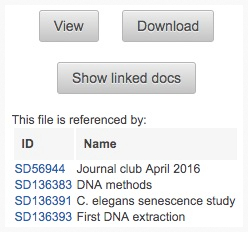 “Show linked docs” feature in “info” panel of RSpace Gallery |
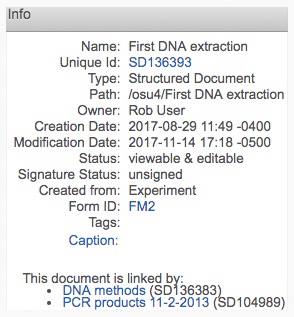 “info” popup showing links to other notebook pages or documents |
For additional details consult the changelog. For details of what’s new in our API see the API changelog. Don’t forget to visit our website,blog, and YouTube channel for more insights on upcoming features, usage tips and events.
RSpace 1.46, Sep 2017 – Integrations with Egnyte and MS Teams
RSpace Connects to MS Teams and Egnyte.
Version 1.46 includes new integrations with popular online tools that will increase your productivity and simplify your workflows, especially if you already use MS Teams in your lab.
Integration with Egnyte secure file sharing. This tool works just like our other connections to external sources of data. Enable Egnyte in the Apps tab by entering the address of your Egnyte account, then click the the Egnyte icon in the document edit tool bar.
The icon looks like this:  Egnyte is especially popular with labs and organizations that value comprehensive security features in their online file storage.
Integration with MS Teams. MS Teams is a powerful tool for communication and coordination of your lab, and works great with Office 365. We are working on additional integrations with other MS online tools too, so stay tuned for more announcements soon. The use of MS teams in your lab is likely to grow as microsoft and its partners continue to add additional intelligent bots and data analyzers that can watch for specific data, channel information efficiently from source to destination more selectively and notify the right users of important events.
For additional details consult the changelog. Don’t forget to visit our website and blog, and subscribe to our YouTube channel for additional insights on upcoming new features and events.
Lastly, RSpace was selected as Labworm’s online research tool of the week, so if you are one of our users who gave us an upvote, we extend our most hearty “Thanks” to you!
RSpace 1.45, Aug 2017 – Export tables, Trace linked data, Assign temporary PI’s
RSpace Version 1.45 is available now, and includes:
- Additional upgrades to the RSpace API for easier ingestion of external data. With each new release, our modern API will sprout new abilities that will help your engineers connect RSpace to anything and everything in your lab. Need inspiration? Check out the RSpace ELN API page on github. Nifty.
- Quick export of tablular data. Click the download button
 on any table of values you have created in your RSpace documents to instantly download the table in .CSV format. Spiffy.
 - Ability to change a lab’s PI – Great for sabbaticals, internal reorganizations, or when you need to assign a temporary PI to a group that’s working on a short term project. Handy.
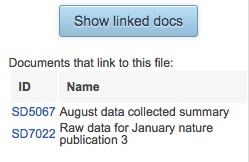 Instant listing of the RSpace documents your data appear in – Boost traceability and quickly see how data stored in your gallery have been used, where the data originally came from and how often it appears in the work of other lab members or collaborators. Downright dandy!
For details of other new features and improvements in version 1.45, consult the changelog. Don’t forget to visit our website and blog, and subscribe to our YouTube channel for additional insights on upcoming new features and events.
If the version number at the bottom left of your RSpace interface shows a version lower than 1.45, alert your system administrator that you need to update your server.
Once again, thank you all for your support. We hope you will tell your colleagues to try RSpace, and we look forward to helping you and your collaborators achieve your scientific goals.
RSpace 1.44, June 2017 – Permissions & Formatted Code
Expanded permission options for P.I.’s + support for formatted code snippets
The RSpace API was built to ease integration with the research data tools you already use. With every release we expand our API’s capabilities, but to make sure that this tool will be really useful for your organization, we need your input:
- What would you like to connect to your ELN?
- What data do you want to ingest, read, or write?
- How would you like incoming data from diverse sources to be represented and organized in RSpace?
Send us an email or tell us your ideas using the built-in live chat.
What’s New in RSpace 1.44?
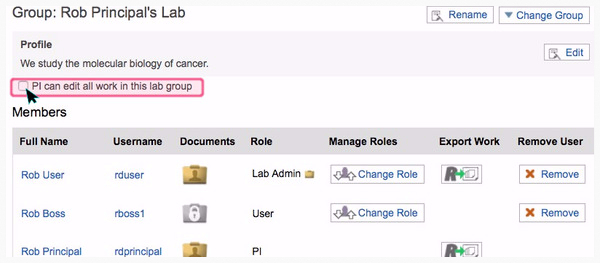
In response to customer input, sysadmins can now allow PI’s to choose ‘edit-all’ permission for all work created by anyone in their LabGroup. The ability for a PI to choose the option to edit all work in their lab can be turned on and off by the system admin for your server. This allows organizations to decide if they want to support this policy.
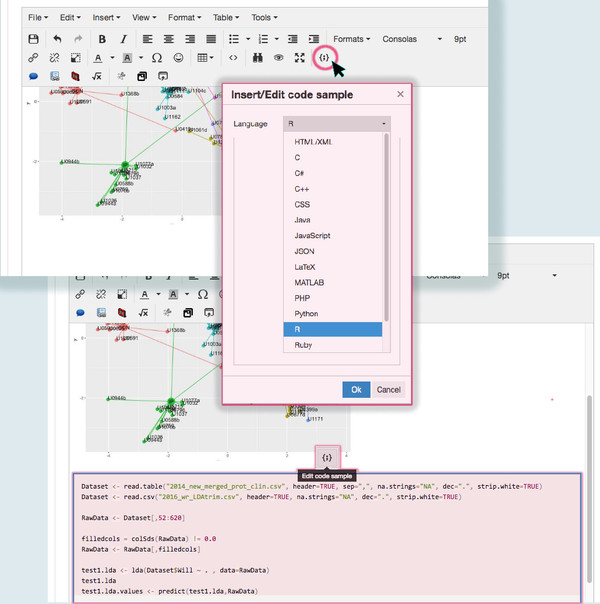
New code snippet options are now available, too, with improved support for inserting formatted code snippets into the text editor, including JSON, R, SQL, LaTex, and MATLAB. This will make RSpace more broadly useful as a way for computer and data scientists or “casual coders” to show downstream audiences exactly what analyses they performed on their data or show critical code snippets they have used in their work.
As always, if you have feedback, questions or suggestions, please click the RSpace help button at the bottom right of the RSpace interface to start a live chat session with an RSpace product specialist!
It looks like this >> 
RSpace 1.43, May 2017 – LaTeX editor, data integrity and other tools
Numerous useful new tools and improvements including LaTeX editor

In version 1.43, we have added a number of useful new tools and improvements. Our new LaTeX equation editor can be accessed from the RSpace text editor toolbar. The button icon is the mathematical expression for square root of x.
Enter your LaTeX code, select “Parse Equation”, and your formula is added to your document.
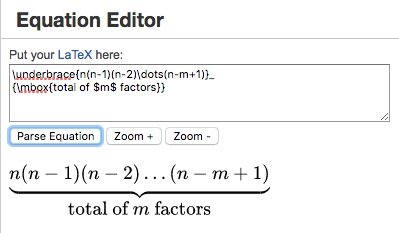
Latex is a popular tool for mathematicians and engineers who need a more sophisticated way to represent formulae and equations in digital documents. Addition of this tool helps to broaden the appeal of RSpace to a variety of disciplines at your institution.
To ensure data integrity and IP protections both inside and outside RSpace we also added a new checksum authentication feature that lets you know for sure that your document has remained unchanged since it was electronically signed. This helps RSpace to protect your intellectual property and assures the scientific integrity of data both inside and outside of the system.
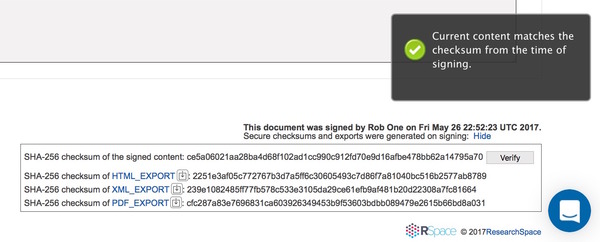
We hope you will also enjoy the UI and search index improvements, tag auto-completion, API enhancements, among others. Consult our changelog for details and stay tuned for still more new user-driven features in the coming releases.
As always, if you have feedback, questions or suggestions, please click the RSpace help button at the bottom right of the RSpace interface to start a live chat session with an RSpace product specialist!
Mass Innovation Labs Announces Adoption of RSpace ELN as Digital Data Management Service for Member Companies
See original press release here.
Mass Innovation Labs calls RSpace “Easy to use, yet fully featured.”
Mass Innovation Labs, a cutting-edge incubator for scientific start-ups, together with the UK firm ResearchSpace, and its Ohio affiliate, Lab-Ally, have announced that the RSpace ELN (electronic lab notebook) will be made available to member companies to help catalyze their research and protect their intellectual property. Mass Innovation Labs has become the accelerator of choice for Boston’s small startups and rapidly maturing life-science companies like Editas Medicine, Cellaria and C4 Therapeutics.

The pairing is especially appropriate: Mass Innovation prides itself on being a flexible and scalable space providing expert support for scientific entrepreneurial organizations of all sizes, while RSpace ELN has been deliberately designed around the same concepts of flexibility and scale. The addition of RSpace to Mass Innovation’s suite of infrastructure tools will facilitate accurate lab data collection and help with trouble-free commercialization of members’ discoveries. RSpace will also smooth the process of graduation from incubator to larger facility by ensuring that critical knowledge assets, IP provenance and due diligence procedures are not lost or disrupted by the logistics of growth, or the rigors of relocation. RSpace ELN features an open framework and modern API that allow seamless integration with data sources like Dropbox, Box, Google Docs, MS OneDrive, and Github, as well as connection to verbose data held in file servers, sample management systems and more. RSpace will help Mass Innovation Labs members share and archive files securely, but also allows for easy bundling and export of data in ways that maintain integrity and traceability. Embedded metadata and digital signatures protect members’ data claims even when information is disclosed externally to auditors, investors or other stakeholders.
“RSpace was chosen because it is easy to use yet fully featured”, said Amrit Chaudhuri, CEO and cofounder of Mass Innovation Labs. “This valuable research tool adds to the arsenal of support we provide to companies in areas like setup, workflow, biosafety and other operational programs, ultimately helping companies start work quickly and significantly reduce the typical time it takes to set up lab operations.”
“We’re delighted to partner with Mass Innovation Labs,” said Rory Macneil, CEO and cofounder of ResearchSpace. “The addition of RSpace as a digital environment to complement the world class physical environment Mass Innovation Labs already provides to its member companies is a great example of Mass Innovation Labs’ commitment to continual innovation.”
Rob Day, CEO of Columbus, OH based Lab-Ally added: “RSpace ELN has been specifically designed for modern, dynamic research environments like Mass Innovation Labs. With features like distributed, hierarchic, configurable administration, we believe that RSpace is ideal for any discovery environment where autonomous organizations or semi-autonomous divisions need privacy, but also want the option for secure collaboration or tiered oversight.”

About Mass Innovation Labs:
Mass Innovation Labs was created “to support an expert powered ecosystem that drives brilliant execution”. Its 124,000-square-foot chemistry and biology space is located among the world’s leading life-science companies in Kendall Square, epicenter of the Boston biotech boom. Comprehensive support for growing member companies includes animal facilities, on-site CRO services, and a range of other scientific amenities. For more information visit massinnovationlabs.com.
About ResearchSpace:
ResearchSpace provides the RSpace electronic lab notebook, which is used by universities, medical schools and life sciences companies around the world. The company mission is to enable researchers to document and protect their work from bench to market or publication, and share it in ways that catalyze discovery. For more information visit researchspace.com
About Lab-Ally:
Lab-Ally operates the US office of ResearchSpace and is involved with the creation of scientific data management tools like RSpace ELN, as well as a variety of other biomedical research ventures. For more information visit lab-ally.com
See RSpace ELN for yourself
Contact us for a live demo of RSpace or for instructions to test a free version yourself
RSpace 1.42, March 2017 – The API is Out
RSpace ELN API allows countless options for handling your data
The RSpace team is pretty good at connecting our solution to other software tools you already use, but it’s not possible for us to anticipate ALL of the many ways you might use the data you collect in RSpace. To help you connect RSpace to anything you like, we want to tell you about our flexible, modern ELN API (Application Program Interface). 
We believe our easy-to-use ELN API is the key to flexible and extensible integration with your overall data strategy and specialized workflows. RSpace makes it easy for anyone in your lab with a little coding knowledge to invent great new ways to extend the functionality of the product, limited only by their own creativity.
To get started, go to My RSpace > My Profile and click “Regenerate key”.

Click on the ELN API documentation link, then click “Authorize” in the top right of the swagger page, and enter your new API key. Click “Documents”, “Files” or “Miscellaneous” at the bottom of the page to see full instructions and code examples for working with the ELN API.
For more details, check our recent blog article. If you want to contribute your ideas to this project you might also look at the RSpace github page here.
As always, if you have feedback or suggestions, don’t forget to click the RSpace help button at the bottom right of the RSpace interface!
It looks like this >> 
 The digital lab; trends in ELN, LIMS and other research software