
Key Features of the CERF e-Lab Notebook
CERF is an all-in-one ELN, EDMS, LIMS & LIS. More than just an e-lab notebook.
If you have already seen the architecture, security, and compliance aspects of CERF, let’s take a virtual tour of just some of the capabilities that set CERF ELN apart from lightweight e-lab notebook products. Do more, spend less, keep your data safe and enjoy hassle-free GLP, ALCOA best practices and 21CFR11 compliance. Use it alone or to complement your specialist LIMS system. Contact us today for details.
Easy Import
Choose your favorite method to import data:
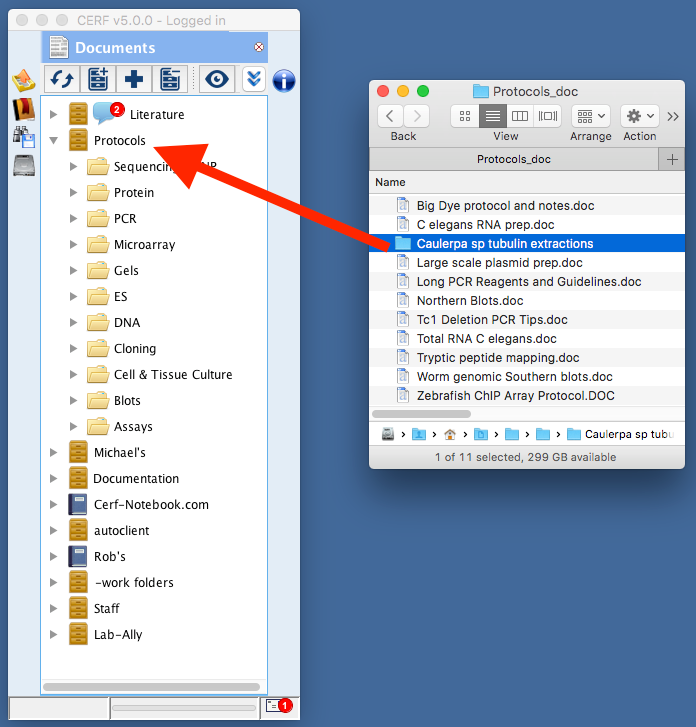
1) Drag and drop of single files or entire hierarchic file trees make getting started with CERF fast and easy. For maximum efficiency, you should trust CERF completely and resist the temptation to keep copies of files on your local computer. You can drag straight from the Mac finder or Windows Explorer if you like, but you can also avoid cluttering your desktop by using CERF’s own built-in Local Files panel to navigate to data on your local machine.

2) Use the CERF Automaton to monitor folders for the arrival of important data files and move them instantly to CERF. This helps organizations demonstrate a compliant chain of custody for any and all data files they collect. The CERF Automaton runs on Windows, Mac OS and Linux machines and can be configured to ingest data from any location on your network, 24 hours a day, 365 days a year. Use it for collecting files from instruments, off-site collaborators, data loggers, timed exports from third party systems or databases and more.
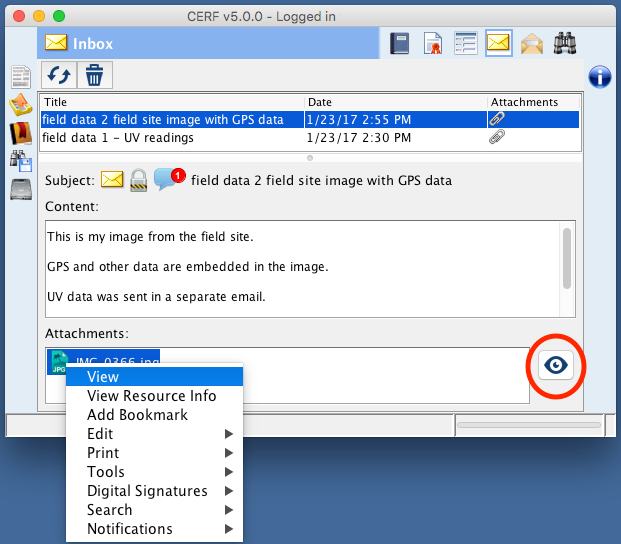
3) Use email-to-CERF to send or forward important emails or attachments to CERF where it instantly becomes part of your official 21CFR11 compliant record and can no longer be accidentally deleted. This is a great way to capture key data quickly for researchers who work in the field with mobile devices.
Access Control
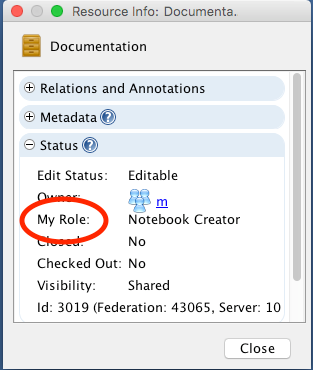
CERF includes 10 different user roles with, plus a range of additional add-on capabilities that can be granted to specific users. This means that access and ability to view, annotate or edit specific resources can be configured with a high degree of granularity. Resources are owned by workgroups, and different users can have different roles in different workgroups, further empowering your organization to decide exactly who can see what and which individuals should be working together collaboratively. Understanding your access to any resource is easy to determine using the Resource Info window.
Organization
CERF lets you organize your work in notebooks and file cabinets just as you would in the real world, but CERF’s ability to create and easily locate multiple links to the same work and to establish logical “see also” relationships between resources allows you to cross-reference and customize the way you organize your files, preventing accumulation of multiple copies of the same item. CERF lets you decide whether a file you use in multiple contexts should exist as independent copies, distinct versions, or links to the exact same file, and CERF only offers you appropriate options for organizing resources that reflect your access role and workgroup memberships.

At-A-Glance Details
The ubiquitous CERF Resource Info panel gives users tremendous awareness of the provenance and meaning of the data they work with every day. Users can generate on-the-fly metadata to improve searchability and CERF can even reach into your files to reveal hidden metadata that uncovers important details about your data that you may not otherwise know.

Best-in-Industry Semantic Search
CERF’s powerful semantic search engine is simply the best available. You can use any one of dozens of possible search parameters, and combine them together to form powerful Boolean queries that can define dynamically updated bundles of specific types of data.

Viewing your files inside CERF
CERF includes a number of viewer plugins that allow you to see many common documents and scientific data files inside CERF without having to open an external application. MS office files, text, html, PDF, AB1 trace files, Chemical structure files of all kinds, GB sequence files and all your images and SVGs can be viewed using CERF.

Round-Trip Editing
CERF uses feature-rich desktop apps for Mac and Windows, not a browser. One of the key advantages of this approach is that browsers cannot interact with your local computer’s OS, so seamless round trip editing of files using your preferred applciations is not possible using a browser alone. CERF uses a check out > edit > check in workflow to make sure that files are only edited by one user at a time. This is an important part of maintaining a comprehensible audit trail that shows WHO has made changes and precisely when they made them. If a file is checked out for editing, other users can still see the content of that file, but they can’t make changes until the file is checked in and once again becomes available for editing. The round-trip editing ability of CERF works with ANY file type and makes use of common, or highly specialized applications you already have on your local computer. With CERF, it is not necessary to create data in strange proprietary formats that only your ELN can use. Instead, CERF lets you use the workflows and tools applications and file types you already use today.

Offline Mode
CERF’s check-out-and-edit functionality means that users can check out files and then edit them offline, even if no internet connection is available. When you return to an environment where you can once again connect to your network, you can then check your edited files back into CERF.
Easy Export and Server-to-Server Migration
CERF supports drag-and-drop export of individual files, but also supports more substantial export of bundled .ZIP files containing entire collections of data and associated metadata. These can be migrated to other CERF servers or converted back into native files using the CERF Exporter App.

Contact us to schedule a demo or request a free trial.
To learn more about the architecture and security aspects of CERF, see our CERF Overview page.
Intersted in reading about more CERF ELN advanced features? Download “Getting Started With CERF” to learn more.
 The digital lab; trends in ELN, LIMS and other research software